
Healthy backlog increment by increment
Chapter 4 of “Digital Products from zero to hero”
Chapter 4 of “Digital Products from zero to hero”
What is in this chapter:
- what is a user story, how to write a good one your team will cherish,
- you will understand parts of a good user story like the acceptance criteria,
- a good starting structure for you and your team’s backlog and what is beyond user stories.
If you are not familiar with the travel issues I faced with my partner or you are curious how to think about a problem and put it to a simple but effective proof of concept, please check out the first chapter:

Now we have two great artifacts to base our application on:
- the Miro board to describe the user journey,
- and our Figma prototype showing how the app would work.
I strongly recommend to read the previous posts before this one, as I will use the context to underpin my points!
However the sheer size of the flow can look intimidating and in certainty, if you would try to now just create the app as-is, you will lose all motivation before arriving to any working condition, may spend months of work to never get it off the ground.
If you do this, in similar situations, during work, you might work for long period of time, months, years, without the application ever be in the hands of someone who would actually use it (including yourself), with the continous voice in our head saying:
- This is not ready yet! Don’t show it, work on it, you will embarrass yourself!
I know it is hard, but the solution: don’t listen to that voice! Instead, approach it systematically, to get early learnings and feedbacks, try to figure out the smallest possible thing you should make that actually delivers value and this is what we going to deep dive into in this post.
Let’s make a value-able increment
If you’ve read the previous posts, you know a bit about the problems we already solved:
- How can we find the common set of the served cities for two departure airports?
- Which flights to take from two airports to arrive in our destination city, around the same time on a given day?
So as a user, I know about myself that the minimum value I am looking for is the pair of the flights to take. In agile/scrum/etc methods to use in digital product deliveries, even in waterfall (where it was called business requirements), we need to clearly define what we expect. We call this a user story, if it is written from the perspective of the user we serve and tells a story. You know, the one you read in books, watch in movies or find literally anywhere in our life, as humans we really like and addicted to stories.
You don’t have to be a great novelist to write good user stories, however still better if we have clear grasps on the basics:
- all stories have a beginning, a middle and an end;
- a good beginning sets the stage and the problem;
- the middle brings our protagonist through actions and reactions, from despair to delight;
- and an ending closes on (hopefully) a successful resolution of the problem.
A sneak-peak on the first user story in the same Miro board:
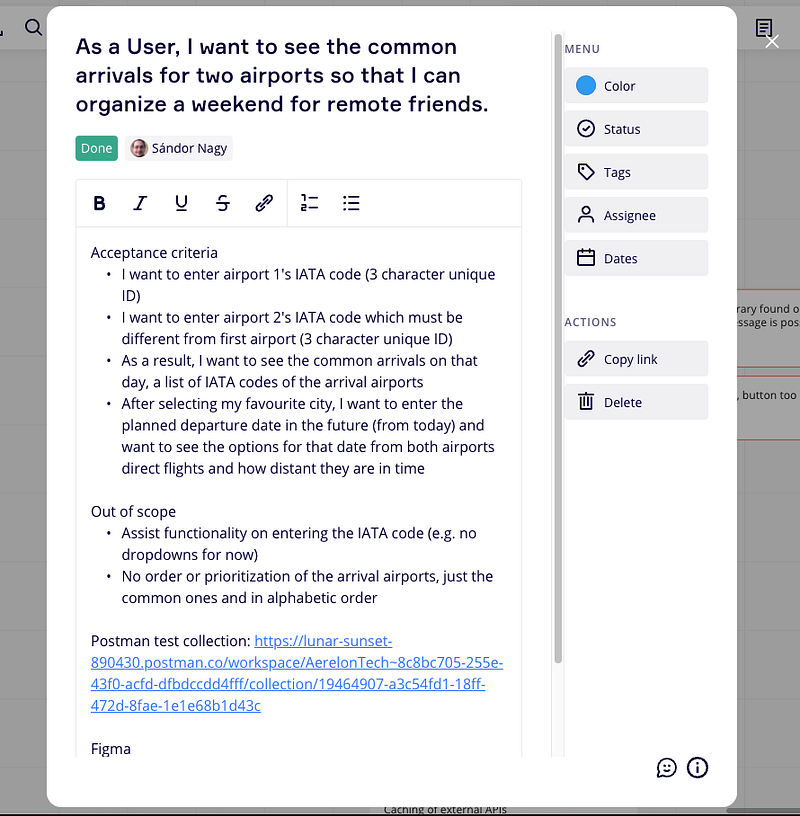
Let’s describe our problem into a story! So my protagonist is myself so it is super easy to think in my own place and describe, I want to see the common arrivals from two airports so I can organize my weekend with my partner. A bit too personal, so applying some empathy, I can imagine any two or more friends to have the same problem in our globalized world:
As a User, I want to see the common arrivals for two airports so that I can organize a weekend for my remote friends.
I add some steps, in plain english to describe basically what happens on the screens and what I expect as a result and call these acceptance criteria.
During this, had some cool ideas to help the life of my user: I could provide a list of existing flight codes or cities so the user does not have to remember or check the airport code somewhere else. While this is so cool, it will definitely increase the work and complexity so I put it into the idea bag and written into the out of scope to remind myself, no need for this functionality to close this story as done!
And finally added some existing materials, link to my Postman collection where I tested the API calls and could link the Deepnote so I can always easily look up the related evidences.
Let’s break down what we see:
- title,
- acceptance criteria,
- out of scope.
What is this weird sentence as title?
The “As a …, I want to … so that I can …” structure is a help to think about three important component for each story:
- the protagonist, in this case the user, however you can have many different protagonists in a complex application, just in ours it is easy to imagine the travel agent who helps organizing travels for the users;
- the initial action that kicks the story into motion, as in every good story, our protagonist needs to be active, to drive the story to its next step and conclusion;
- and the goal our protagonist has in mind, this is to be able to easily check if the story’s content actually drives to the outcome desired by our protagonist, this helps a lot to decide what is in scope or not for this particular story.
Using this structure is not a rule or a must, you can have your own style or other ways to describe, what is really important is to consciously think of those components to outline the journey our user will need to take to get to their goal. And especially if there is no goal in mind, how can you decide later if the steps taken are in the good direction?
A good user story is:
- goal or outcome driven,
- small (ideally the smallest possible).
Why don’t we just say “As a User, I want to travel so that I can meet my friend”?
A good user story is concrete, you can easily grasp its start and end even without reading the journey and requirements to be done.
And user stories are a tool to break down a huge problem into manageable pieces which is a hard yet important skill to learn and usually can not be done in a vacuum. As its primary role to communicate needs, requirements, you need to work with your team to build up a common understanding, process and practices on how you communicate best (as there are no two identical teams, it is a learning process and be always open to revisit how you structure your stories).
Another role is to be able to transparently see, what has been done already and what needs to be done in the near future. If you leave a story too big, you and your team will need more time to work on it, most probaly more risks and uncertainties left in the story which will further increase time, leading to delays and lower visibility on progress.
When your team does not see the progress, motivation falls, and mistakes, double work, in short, waste will go up. In my experience, good user stories are more valuable than any other documentation you will ever do or have.
Do I write user stories like “As a developer” or “As an IT operations”?
Ideally no, you don’t have to force everything into an user story just because we already have that structure.
Can use tech spikes, tasks, subtasks, and other plenty of approaches to describe and follow up on non-user related problems, however first always check if it is possible to organize the technical needs under an upcoming user story! About this we will see a few ideas in the next post when we solve the user story for the technical folks.
Acceptance criteria, what’s that?
These are the checkbox criterias, “must haves” we need to check for when we “feel” the story is done so we can really test the application and close the story as done.
Serves a few purpose:
- during figuring out how to solve the problem, gives guidelines, defines exact requirements;
- during development, you might have new ideas, learn something new and want to add a new step or remove one, changing these immediately must trigger in your mind “scope creep!” and alert should go off;
- during manual testing (either done by QA, or the product owner, or anyone), presents the steps to take and try with the clear results.
Good acceptance criterias are always about the actions and reactions for the protagonist, our user and business process steps, etc.
Never put technical terms, tech stack elements, and similar into acceptance criteria, e.g. “this data has to be saved into database” as this is not part of the requirement, it is part of the solution and you don’t want to block or direct the engineers on how to solve the problem best. About the solution we will discuss how to approach in the next post.
What useful informations I should record on the user stories?
Really useful content can be the “Out of scope” section, especially if you link other user stories for each idea as it clarifies for possible future arguments and spares a lot of meeting times, shortens demoes and clears expectations of stakeholders in advance! E.g. you don’t have to argue the tenth times with new people saying “but I thought this will be done”, you will thank yourself for a million times to write these down!
Another bunch of interesting things to collect and write into the story depends on your circumstances, the needs of your team, so we will discuss a few more things in the next post to include. For now, only practice and focus on the smallest possible increment, one by one and how they follow each other!
A backlog structure
In previous post, I already went through the process so just a small reminder here:
- proof of concept,
- design,
- delivery,
- testing,
- and tracking
are the main phases/steps with some details under each.
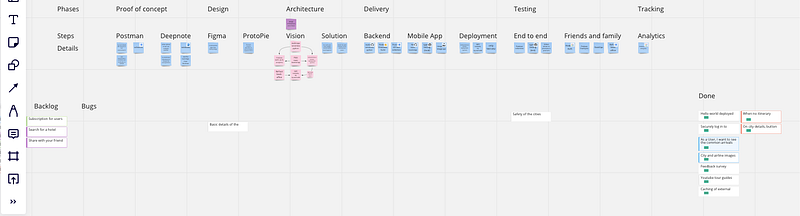
However now with a user story in mind, we can evolve the process a bit. (See the chicken and egg problem? Actually it does not matter which one you start with. From now on we iterate on the process, create stories with that process in mind and return to iterate on the structure again until we are happy digital factory owners and just churning out features in an increasing speed. 🙂)
With the story now in our hands, and if we can still keep ourselves back a bit from jumping right into coding, we can think of a high-level solution and write it into the story, especially if we are now working on something else and can only come back later to this story, useful to makes us remember.
We can introduce Definition of Ready and Definition of Done for the team, add analytics requirements so we don’t forget to collect valuable insights of our application usage, all these topics are too large to discuss in this post, we will look into these in later posts.
How can I see what are we working on?
Let’s set up the statuses our user story will go through so we will have the transparency that is easy to communicate for stakeholders too.
What is simple to start with and you probably will keep with it for a long time:
- Backlog: all stories that are not yet worked on by engineer(s) to actually deliver,
- In progress: stories that are being actually coded, worked on,
- Testing/in-review: when an engineer finished working on a story and gives it to the product owner for review so they can accept it,
- Done: when the product owner decided that it is ready to be shipped for the customers.
Few good additions, especially if a lot of work and time goes into the steps could be:
- Refining: when so many ideas start to pollute your backlog, you can add one more column or status to keep track of the stories you already put some effort into detailing and getting it ready for development, these will be your teams first choice to progress with.
- Blocked: for good transparency, keep to one “In progress” ticket per person in all times however you will inevitably run into problems which cause a ticket to wait, for example there is an issue on the integrated service and you can not do anything else then wait for the vendor to fix it, until that I don’t want to do nothing, just switch to another task, record the previous one what it is waiting on and return to it when it can move on. And of course, always finish the tasks that are started otherwise they become a waste!
Structure stories into epics
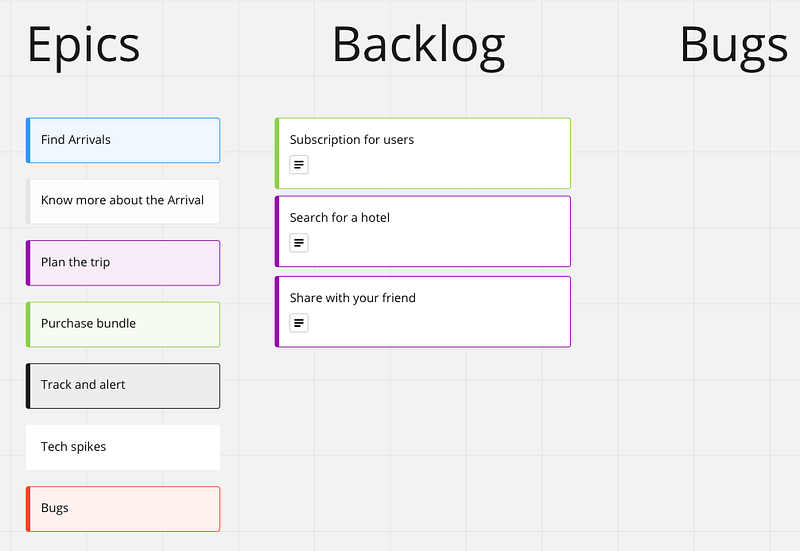
My usual personal approach is to use Epics as feature-sets or medium-large sized features that has a business sense to actually deliver. Thinking that each user story is a deliverable, deployable piece of solution that incrementally solves a user’s problem, in the reality it is not every time feasible to deploy to end users each and every story.
Which leads to a very flexible understanding of what Epics stands for in my opinion and just used to group user stories for easier overview matching the current needs. In the above example, I just categorize technical tasks, tracking and bugs away from user centric journeys, and the user journeys are just categorized into larger chunks. These larger chunks are based on the flows I draw up in Figma earlier which in turn simply extends my original thinking, making it easier to reference in between and follow the logic.
What is going on with bugs?
There are two points in time when you can notice bugs, problems when the application does not work as expected:
- during review of the supposedly done user story,
- after the story was done.
During review, you still have the option to send it back with feedback for the engineer to work more and fix it, or if the bug is unrelated to the user story at hand, should do the same thing as you would do after the story was done:
Create a bug ticket!
It should not be a user story as all user story has a few things in common which bugs relentlessly avoid: predictability.
User stories always aimed to be predictable, risks are removed by figuring out a solution as much as it is possible in advance. A bug however is a bug because at first, we don’t know the root cause or the fix for it, hence it is unpredictable how to fix it!
As the approach is different and bugs first needs to be repeated and researched, explored where they come from and how to prevent, avoid or fix them, they need their own type of ticket and can not be described as a user story.
Except when it is a mistake in the user flow on purely user perspective, then it might be a valuable increment itself, let’s discuss the topic of bugs in a separate post!
Tools
I showed Miro for this post, however not long after I made my first user stories in Miro, I moved to my usual tool of Jira and Confluence, but you can use any tools you already familiar with, does not really matter which tools to use on this level, Trello, Linear, even sometimes Excel can be enough or a Google Sheet, just keep on improving on the process and use the best tool available for the purpose.
Epilogue
Now you have seen what is a user story and got some help describing one. I will use this user story in the next posts when working on the mobile application and necessary deliverable items and it will guide me on what to create and what to avoid for now.
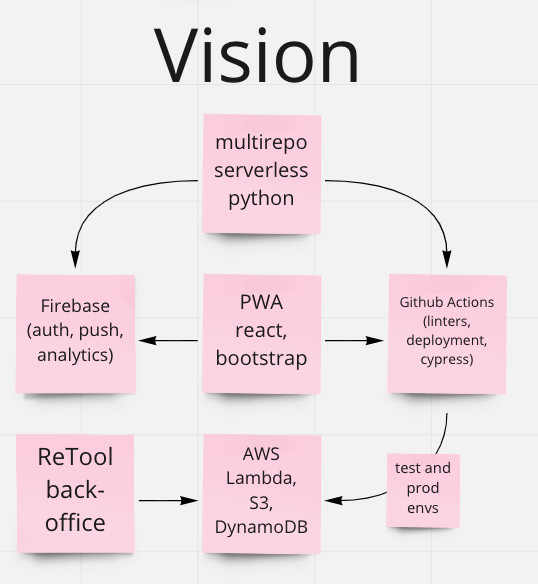
In next chapter, I will go through on the architecture and tech stack to solve the user story.
Insights
- A good user story is the core of a transparent, well structured digital product delivery and can keep you on track, motivated and let’s others pick up the context and pace quickly!
- Always aim for the smallest valuable increment in each story, put cool ideas into the backlog and note them as out-of-scope to avoid misunderstandings and further arguments!
- Don’t force everything into user stories, there are other structures and tools to utilize!
- The actual tool you use (be it Miro, Trello, Jira, etc.) does not matter as much as your well-structured process and content!